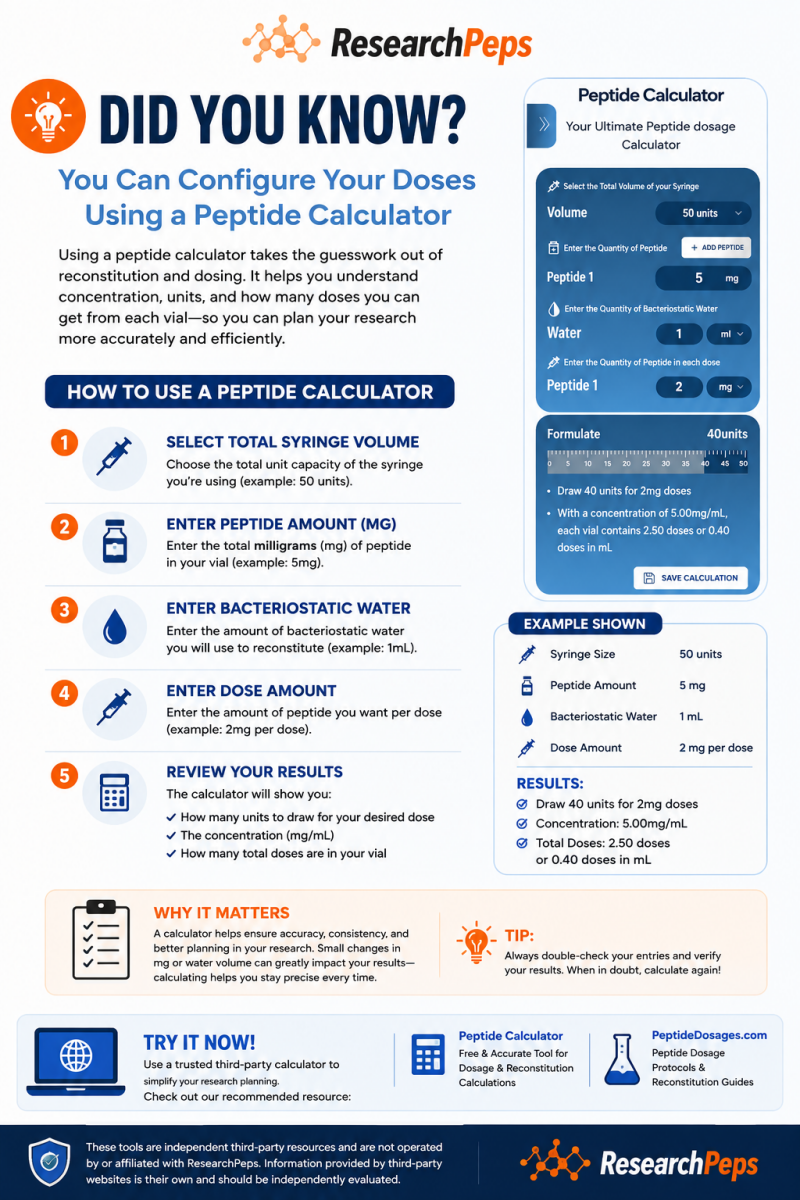
💡 Did You Know? You Can Configure Research Calculations With a Calculator
Understanding How Research Calculators Simplify Concentration & Reconstitution Math
Research calculations can involve several measurements at once—milligrams (mg), milliliters (mL), concentration (mg/mL), and syringe units.
Because changing even one of these values can change the final calculation, a research calculator can be a helpful tool for organizing the numbers and reducing manual math errors.
A calculator doesn't decide what amount should be used in an experiment. Instead, it performs the mathematical conversion based on the values entered by the researcher.
🧮 What Does a Research Calculator Do?
A calculator takes several pieces of information and uses them together to determine concentration and volume-based measurements.
Depending on the calculator, you may be asked to enter:
-
Total syringe volume
-
Total amount of compound in the vial (mg)
-
Amount of reconstitution solution (mL)
-
Desired experimental amount (mg or mcg)
Once those values are entered, the calculator performs the conversion automatically.
It may display results such as:
Concentration in mg/mL
Corresponding liquid volume
Syringe-unit equivalent
Number of equal experimental portions available
🔬 How to Use a Research Calculator
1. Select the Syringe Volume
Start by selecting the total capacity of the syringe or measuring device being used.
For example, a calculator may offer options such as 30 units, 50 units, or 100 units.
This is important because the calculator needs to know how the measurement markings correspond to liquid volume.
2. Enter the Total Compound Amount
Next, enter the total milligrams (mg) listed on the vial.
For example:
5 mg vial → enter 5 mg
The mg represents the total amount of compound contained in the vial.
It does not, by itself, tell you the concentration of the reconstituted solution.
3. Enter the Reconstitution Volume
Next, enter the amount of reconstitution solution being used.
For example:
1 mL
This allows the calculator to determine the resulting concentration.
Example:
If a vial contains 5 mg and the final volume is 1 mL, the concentration is:
5 mg/mL
If the same 5 mg were instead brought to a final volume of 2 mL, the concentration would be different.
The total compound remains 5 mg—only its concentration changes.
4. Enter the Experimental Amount
The calculator may then ask for the amount of compound being used for the particular research calculation.
Once entered, the calculator compares that amount with the concentration of the solution.
It can then convert the requested amount into a corresponding liquid volume or syringe-unit measurement.
💡 Example Calculation
Using the example shown in our graphic:
Syringe Capacity: 50 units
Compound Amount: 5 mg
Reconstitution Volume: 1 mL
Example Research Amount: 2 mg
The concentration would be:
5 mg/mL
A 2 mg portion represents 0.4 mL of that solution.
On a standard U-100 scale, where 1 mL corresponds to 100 units, 0.4 mL corresponds mathematically to 40 units.
This example demonstrates how a calculator converts the information entered into a measurable volume.
It is a mathematical example—not a recommended protocol or amount.
🧪 Why Does the Amount of Reconstitution Solution Matter?
This is one of the most important concepts to understand.
Changing the amount of liquid changes the concentration, but it does not change the total amount of compound originally contained in the vial.
For example:
5 mg + final volume of 1 mL = 5 mg/mL
5 mg + final volume of 2 mL = 2.5 mg/mL
Both examples still contain 5 mg total compound.
The difference is how much liquid that compound is distributed throughout.
📏 Understanding mg, mL & Units
These measurements describe different things.
mg — Milligrams
The mass or amount of compound.
mL — Milliliters
The volume of liquid.
mg/mL — Concentration
The amount of compound contained in each milliliter of solution.
Units
Graduated markings on certain syringes or measuring devices used to represent liquid volume.
Understanding the difference between these measurements makes calculator results much easier to interpret.
⚠️ Always Double-Check Your Entries
A calculator can perform the mathematics correctly while still producing an incorrect result if incorrect information is entered.
Before relying on a calculation, verify:
✓ The correct vial mg was entered
✓ The correct liquid volume was entered
✓ The correct measurement units were selected
✓ mg and mcg were not accidentally confused
✓ The correct syringe capacity was selected
✓ The displayed calculation matches the intended research setup
When in doubt, calculate again.
💡 DID YOU KNOW?
A research calculator doesn't determine the protocol—it calculates the math.
The result is based entirely on the information entered.
Changing the mg, liquid volume, syringe size, or experimental amount can change the resulting calculation.
That's why understanding what each field represents is just as important as using the calculator itself.
🔗 Independent Research Calculation Resources
For researchers who prefer an automated calculation tool, independent third-party resources are available, including:
Peptide Calculator
Free calculator for research concentration and reconstitution calculations.
PeptideDosages.com
Independent protocols and reconstitution guides.
These websites are independent third-party resources and are not operated by or affiliated with ResearchPeps. Information provided by third-party websites is their own and should be independently evaluated.
🔬 ResearchPeps Journal
Research. Education. Knowledge.
Continue exploring our Did You Know? series for simple explanations of mg, concentration, reconstitution, lyophilization, COAs, laboratory testing, and other commonly misunderstood research concepts.
This article is provided for general research and educational purposes only. ResearchPeps products are sold strictly for research purposes and are not intended for human consumption or medical use.